
Dynamic Menus
The DCMS menu is stored as data rather than as a fixed list of links in page markup. Each MenuItem record has a title, optional parent, route type, route target, visitor mask, sort order, and active state. ParentMenuItemID forms the hierarchy; SortOrder arranges siblings; VisitorMask determines which selected audience sees each item.
How the visitor mask filters the menu
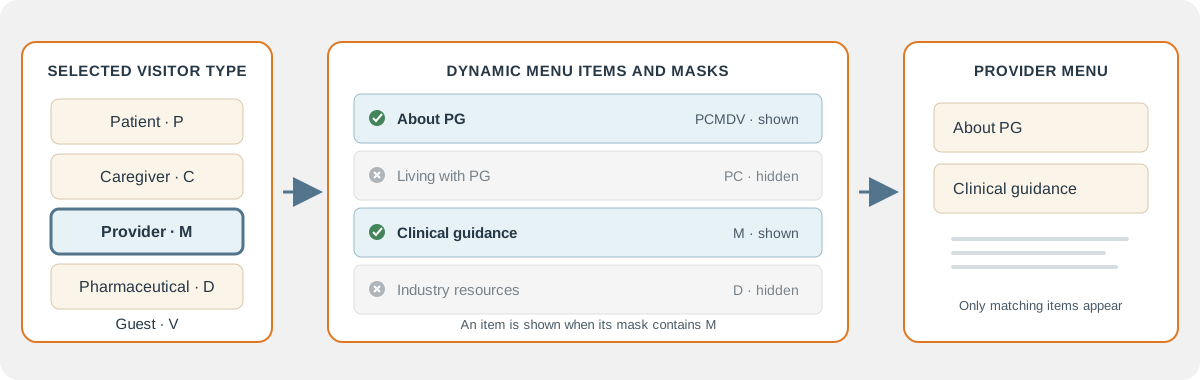
Each menu item has a visitor mask: the visitor types allowed to see it. When a Provider (M) is selected, for example, the website shows menu items whose masks include M. Items for other visitor types are left out of that menu.
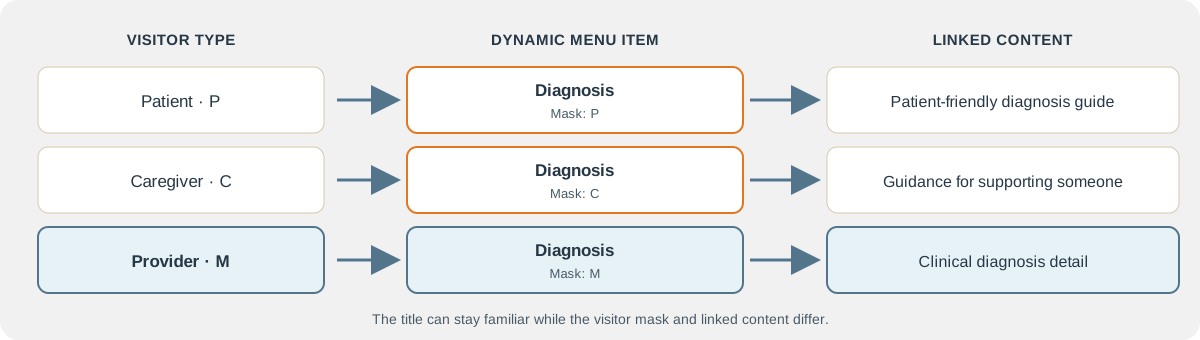
A shared title can also have separate menu records for different audiences. Each record can link to content written for that visitor type.
Menu identity and content identity
MenuItemID identifies the navigation choice. ContentDocumentID identifies its associated article. For a content route, the menu item is created first, then a placeholder document supplies its ContentDocumentID. The RouteTarget carries the route to that document, for example /content?target=18.
This is why the same visible title can occur in multiple places. In the supplied menu data, “Emotional Journey” has separate general, patient, and caregiver rows. Each has its own MenuItemID and ContentDocumentID, so the eventual articles can differ by audience without title-based lookup conflicts.
Route types
The current menu data uses four route types:
| Code | Destination | Example |
|---|---|---|
| V | Select a visitor experience | /visitor?target=Patient |
| C | Load a content document | /content?target=18 |
| P | Open an application page | /page?target=clinicfinder.cshtml |
| R | Follow a redirect | /redirect?target=https://example.org/ |
RouteTarget is stored as a route string. MenuItemList exposes it for inspection; it does not derive the URL from a slug. The proof of concept uses the stored route and adds MenuItemID as menu context where needed.
How menu data gets published
Master_Menu.csv is loaded into the master-menu tables, normalized, and passed through test and staging routines. Validation checks route values, visitor masks, ordering, and hierarchy. Publication builds the runtime MenuItem tree and creates missing content placeholders. The legacy-site migration process is separate: it captures source content and mappings in migration tables before publishing to content tables.
Both current publication paths clear existing content as part of their rebuild. They are suitable for the present empty authored-content state, but require preservation behavior before the content library is populated and regular updates begin.
For exact record examples, see Main Tables and the Database Schema. The detailed menu specification explains the proof-of-concept rendering path; Menu Workflow documents import, validation, and rebuild behavior.