
DCMS - Rendering Content
Overview
DCMS stores page content in the database and renders the content within an HTML page through a set of reusable partil Razor Pages I’m calling Content Cards (CC) . Each CC knows how to render exactly one type of content. The easiest content to render of course is Text, either in the form of HTML or MD (MarkDown). Other types would be Audio, Video, Images etc. Each different type is called a Mime Type, The goal of using CCs is to write the code to render all Mime Ty[e used by the systme once, and never have to write that code again.
It’s easy to render say, an image. You don’t need a CC to do that. Not only does the CC know as well, it also has properties that know WHERE to put the image, using a field in the database called BlockInfo.
We do not have to create CCs for all possible Mime Types, only the ones we use. The general process for all CC type is as follows:
/Content/Index?target={ContentDocumentID}
    -> load the content document and its elements (pieces of the content)
    -> identify its ContentType, FormatType and MimeType
    -> select the appropriate content page based on ContentType
    -> create CCs as needed, based on the different MimeTypes of all the elements
    -> identify where to put the CC in relation to all the other CCs (in order, with positioning)
For example:
ContentType = Article
-- the MenuItem indicates which content record to load, such as /content?target=11
-- the system reads ContentDocument = 11 and any ContentElements
-- we now have the RouteType = 'C', ContentType = 'A', and various MimeTypes of the elements
-- the system routes the request to /Content/Index.cshtml which knows how to handle 'Content'
-- after doing whatever it has to do, it sends the request to /Content/Article page
-- it sees the next MimeType is 'M' for MD and creates a MarkDown CC
-- it sets the CC text to the text of the ContentElement record
-- it sets the position of the CC based on the BlockInfo
-- the system adds any additional elements to the page
-- the system then renders the entire page as HTML to the website
An article page and a gallery page can use different layouts and different content cards without requiring /Content/Index to understand every presentation detail.
The design follows this rule:
The document identifies the kind of page. The elements supply the page’s content. The content page controls composition. The content cards control presentation.
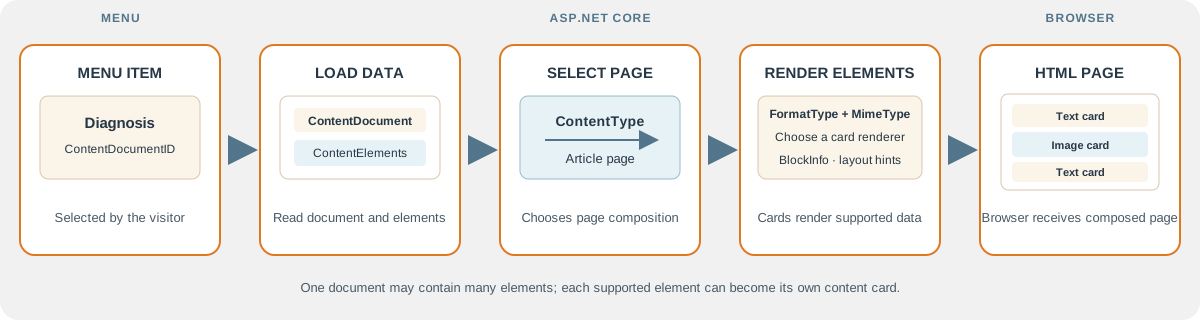
Conceptual model 1: From menu selection to rendered page
ASP.NET Core receives the selected content document, loads its elements, chooses the page type, and uses supported content cards to produce the HTML page. This is a high-level model; not every renderer shown in the design is implemented.
Conceptual model 2: One article, multiple content cards
This article example shows how one ContentDocument can contain several ContentElement records. Each supported element can be rendered by an appropriate card, and BlockInfo can provide optional layout hints.
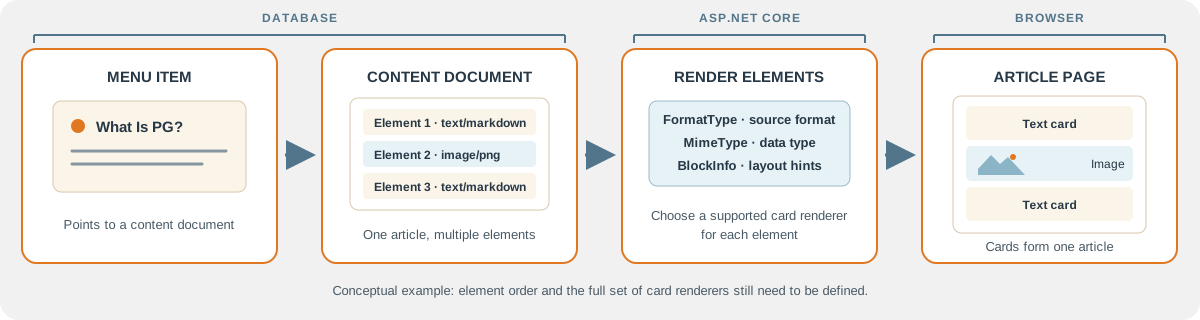
The element sequence in this example is illustrative. The current schema does not persist an explicit order, and the complete set of supported card renderers remains to be defined.
1. Content Responsibilities
The content model separates several concerns that are easy to confuse:
| Concept | Question it answers | Stored on |
|---|---|---|
ContentType |
What kind of document or page is this? | ContentDocument |
FormatType |
What format is the stored source written in? | ContentElement |
MimeType |
What kind of data does the element represent? | ContentElement |
BlockInfo |
How and where should the element be placed? | ContentElement |
ContentElement |
What individual piece belongs to the page? | ContentElement |
| Content card | How should one element be rendered as HTML? | Razor partial |
These values work together but do not replace one another.
For example:
ContentDocument:
    ContentType = Article

ContentElement:
    FormatType = Markdown
    MimeType   = Text
    BlockInfo  = {"region":"main","width":"full"}
This means the document is an article, the element is stored as Markdown, the element contains text, and the element should use the main page region at full width.
2. A Content Document Represents a Page
ContentDocument is the page-level record. It contains the document’s identity, description, type, workflow state, publication state, metadata, and relationship to the menu item.
The implemented table contains:
| Column | Purpose |
|---|---|
ContentDocumentID |
Unique document identity and canonical content route target |
MenuItemID |
Menu item associated with the document |
ContentType |
Selects the specialized content page |
Description |
Basic document description |
MetaData |
Page-level JSON metadata |
WorkflowStatus |
Curating and publication workflow state |
IsPublished |
Indicates whether the document is published |
PublishedDate |
Publication timestamp |
CreatedDate |
Creation timestamp |
ModifiedDate |
Last modification timestamp |
The menu item creates the route to the document:
/Content/Index?target={ContentDocumentID}
The document may contain one element or many elements. Both are valid:
Article:
    one Markdown element containing the complete article

Gallery:
    many image elements, one for each image
There is no requirement that every page be broken into many small records. A simple description such as “What Is PG?” may be one complete Markdown element.
3. A Content Element Represents Part of a Page
ContentElement is a child record belonging to one ContentDocument. It stores the source or reference for one renderable part of the page.
The implemented table contains:
| Column | Purpose |
|---|---|
ContentElementID |
Unique element identity |
ContentDocumentID |
Parent document |
FormatType |
Format of the stored source |
MimeType |
Type of data represented by the element |
BlockInfo |
Required JSON metadata for placement and presentation |
TextContent |
Text, Markdown, or other text source |
BinaryContent |
Optional binary data |
LocalFilePath |
Optional application-hosted file path |
ExternalFilePath |
Optional external file reference |
CreatedDate |
Creation timestamp |
ModifiedDate |
Last modification timestamp |
An element can therefore store content directly or refer to content stored elsewhere:
TextContent       -> Markdown or plain text
BinaryContent     -> image or other binary data
LocalFilePath     -> file hosted by the application
ExternalFilePath  -> permitted external resource
The application should define which combinations are valid for each supported element type.
4. ContentType Selects the Page Renderer
ContentType describes the overall nature of the document. It is not the same thing as the format of an individual element.
Examples:
| ContentType | Specialized page | Typical purpose |
|---|---|---|
Article |
/Content/Article |
Standard text-focused article |
Gallery |
/Content/Gallery |
Collection of images |
FAQ |
/Content/FAQ |
Questions and answers |
Document |
/Content/Document |
Downloadable or document-oriented content |
The actual database codes and descriptions are defined by the ContentType lookup table. The page-selection code should use those configured codes rather than hard-code display text.
The dispatcher owns common work:
- Validate
ContentDocumentID. - Load the
ContentDocument. - Check active, publication, workflow, and visitor rules.
- Read
ContentType. - Select the specialized page.
- Pass the document or its elements to that page.
The specialized page owns presentation-specific work.
5. FormatType Describes the Stored Source
FormatType answers:
How is the source stored or authored?
For a first implementation, the useful formats are small in number:
| Format | Stored source | Processing |
|---|---|---|
| Plain text | Ordinary text | HTML-encode before rendering |
| Markdown | Markdown source | Parse to HTML, then sanitize |
| HTML | HTML source | Sanitize before rendering; add only when needed |
| Binary/file | Binary data or a file reference | Use the appropriate file renderer |
The current database uses a lookup code in ContentElement.FormatType. The code’s description should identify the configured format. The web application should map that configured value to a known renderer.
Markdown is the recommended initial authoring format for ordinary articles:
# What Is PG?

Pyoderma gangrenosum is a rare inflammatory skin condition.

## Symptoms

Symptoms may include painful sores and inflammation.
One Markdown element can produce headings, paragraphs, lists, links, and emphasis without requiring a separate database row for every paragraph.
6. MimeType Identifies the Element Data
MimeType answers:
What kind of data does this element represent?
Examples include:
text/plain
text/markdown
text/html
image/jpeg
image/png
application/pdf
The current database stores the configured MimeType lookup code as a one-character value and joins to the MimeType table for its description. The application should use the lookup definition rather than assuming that the database column itself contains the literal MIME string.
MimeType and FormatType can describe different aspects of the same element:
FormatType = Markdown
MimeType   = text/markdown
The browser may ultimately receive HTML after the Markdown is parsed:
Markdown source
    -> Markdown parser
    -> sanitized HTML
    -> Razor output
Therefore, MIME type is not by itself a complete page-layout instruction. The content card and the selected page still control how the data is presented.
7. BlockInfo Provides Optional Layout Metadata
Each element has its own BlockInfo JSON document. The database requires it to contain valid JSON, but the JSON can be extended as the rendering system grows.
Example:
{
  "region": "main",
  "width": "full",
  "align": "center",
  "cssClass": "article-introduction"
}
An image might use:
{
  "region": "main",
  "width": "half",
  "align": "right",
  "caption": true
}
Prefer logical layout instructions over absolute screen coordinates:
Preferred:
    region = main
    width = half
    align = right

Avoid as a default:
    top = 240
    left = 620
Logical values work better across phones, tablets, and desktop screens. The Razor page and CSS determine how those values become HTML layout.
The initial rules should be simple:
- Elements are rendered in their normal document order.
BlockInfois optional presentation metadata.- Unknown JSON properties do not change behavior.
- Each specialized page recognizes only the properties it supports.
- Layout metadata must not contain arbitrary executable code.
BlockInfo describes placement; it should not become a second programming language.
8. Ordering Elements
The intended page model is that elements flow in order and can optionally use BlockInfo to influence placement.
For example:
Element 1 -> article introduction
Element 2 -> image
Element 3 -> article body
Element 4 -> related link
The current ContentElement table does not yet contain a dedicated SortOrder column. Before implementing ordered multi-element rendering, add a persisted ordering value or define and document another reliable ordering rule. ContentElementID may appear to provide insertion order, but it should not be treated as an intentional editorial order unless that behavior is explicitly selected.
The preferred implementation is:
SortOrder = primary page-flow order
ContentElementID = stable identity only
This keeps editorial placement separate from database identity.
9. Content Dispatcher
/Content/Index is the common entry point for content routes:
/Content/Index?target=2345
Conceptual PageModel:
public class IndexModel : PageModel
{
    private readonly AllThingsPGContext _db;

    public IndexModel(AllThingsPGContext db)
    {
        _db = db;
    }

    public IActionResult OnGet(int target)
    {
        var document = _db.ContentDocuments
            .AsNoTracking()
            .SingleOrDefault(d =>
                d.ContentDocumentID == target &&
                d.IsPublished);

        if (document is null)
        {
            return NotFound();
        }

        return document.ContentType switch
        {
            "Article" => RedirectToPage(
                "/Content/Article",
                new { target = document.ContentDocumentID }),

            "Gallery" => RedirectToPage(
                "/Content/Gallery",
                new { target = document.ContentDocumentID }),

            _ => RedirectToPage(
                "/Content/Unavailable",
                new { target = document.ContentDocumentID })
        };
    }
}
The exact codes should come from the database lookup configuration. The example demonstrates the pattern, not a final list of production codes.
The dispatcher should also enforce the common rules that apply to every content type:
- the document exists;
- the associated menu item is active;
- the current visitor may access the menu item;
- the workflow and publication state allow display;
- the content type is supported.
10. Specialized Content Pages
Each content page knows how to compose one kind of document.
Article page
An article page might render one or more text, image, and callout elements:
/Content/Article?target=2345
    -> article header
    -> ordered article elements
    -> article-specific content cards
Gallery page
A gallery page can select image elements and repeat an image card:
/Content/Gallery?target=2480
    -> gallery header
    -> image element 1 -> gallery image card
    -> image element 2 -> gallery image card
    -> image element 3 -> gallery image card
The gallery page can implement thumbnails, responsive grids, captions, lazy loading, and future modal behavior without forcing the article page to understand galleries.
11. Content Cards
A content card is a Razor partial that renders one element in a particular presentation.
Suggested structure:
Pages/Shared/ContentCards/
    _MarkdownCard.cshtml
    _PlainTextCard.cshtml
    _ImageCard.cshtml
    _CalloutCard.cshtml
    _LinkCard.cshtml
    _GalleryImageCard.cshtml
    _UnsupportedCard.cshtml
The page controls which card to use. The card controls its own HTML.
Example gallery page:
@foreach (var image in Model.Elements
    .Where(e => e.MimeTypeDescription == "image")
    .OrderBy(e => e.SortOrder))
{
    <partial name="ContentCards/_GalleryImageCard"
             model="image" />
}
Example image card:
@model ContentElementViewModel

<figure class="gallery-card">
    <img class="gallery-card__image"
         src="@Model.SourceUrl"
         alt="@Model.AltText"
         loading="lazy" />

    @if (!string.IsNullOrWhiteSpace(Model.Caption))
    {
        <figcaption class="gallery-card__caption">
            @Model.Caption
        </figcaption>
    }
</figure>
The actual view model should expose safe, prepared values such as SourceUrl, AltText, and Caption rather than making the partial understand database storage choices.
The same image element can use different cards:
Article page:
    Image element -> _ArticleImageCard.cshtml

Gallery page:
    Image element -> _GalleryImageCard.cshtml
This is the central flexibility of the card approach.
12. Initial Rendering Scope
The proof of concept should support a small number of known rendering cases instead of attempting every MIME type.
Recommended first scope:
| Element use | Source | Initial result |
|---|---|---|
| Article body | Markdown text | Sanitized HTML in normal page flow |
| Plain message | Plain text | HTML-encoded paragraph |
| Image | File path, external path, or supported binary | Responsive image card |
| Callout | Markdown or plain text | Styled callout card |
| Related link | Controlled URL and display text | Accessible link card |
Postpone or explicitly mark unsupported:
- arbitrary executable markup;
- untrusted raw HTML;
- video players;
- PDF embedding;
- audio;
- third-party embeds;
- arbitrary JavaScript;
- custom CSS supplied through
BlockInfo.
Unsupported combinations should render a controlled fallback card or an appropriate unavailable message. They should not fail silently or emit unsafe content.
13. Rendering Pipeline
The complete first-version pipeline is:
MenuItem
    -> /Content/Index?target=ContentDocumentID

Content/Index
    -> load ContentDocument
    -> validate access and publication
    -> select ContentType page

Specialized content page
    -> load active ContentElements
    -> order elements
    -> interpret supported BlockInfo
    -> select content card

Content card
    -> read prepared view-model values
    -> parse or transform source
    -> encode or sanitize output
    -> render HTML
The page composition and element rendering remain separate:
Content page = which elements, in which page structure
Content card = how one element becomes HTML
14. Safety and Validation
Database content is still input. It must not automatically be treated as trusted HTML or trusted URLs.
The application should:
- HTML-encode plain text;
- parse Markdown with a configured safe policy;
- sanitize generated HTML;
- validate image and file paths;
- restrict external resources to permitted schemes and destinations;
- avoid rendering executable content;
- validate
BlockInfovalues against supported properties; - provide safe fallback behavior for unsupported format or MIME combinations;
- enforce visitor visibility and publication checks at request time.
In particular, do not use Html.Raw on arbitrary database text without sanitizing it first.
15. Current Schema Versus Rendering Needs
The current SQL schema already provides the core foundation:
ContentDocumentas the page-level record;ContentElementas the child record;ContentTypeas the document renderer selector;FormatTypeandMimeTypelookup relationships;- JSON validation for
MetaDataandBlockInfo; - text, binary, local-file, and external-file storage options;
ContentDocumentListandContentElementListviews for joined data.
Before implementing multi-element page rendering, confirm or add:
- A deliberate element order such as
SortOrder. - A clear configured mapping from
ContentTypeto specialized page. - A clear mapping from
FormatTypeandMimeTypeto supported content cards. - A safe view model that prepares source URLs, captions, alt text, and layout values.
- A defined fallback for unsupported content.
These additions are smaller and safer than designing a general page-builder system.
16. Recommended Implementation Sequence
- Add or confirm
SortOrderforContentElement. - Create the
Content/Indexdispatcher. - Create one specialized
/Content/Articlepage. - Support one Markdown element containing a complete article.
- Add Markdown parsing and HTML sanitization.
- Add an image card with safe source and alt-text handling.
- Create
/Content/Galleryand repeat the image card for image elements. - Add
BlockInfosupport for a small set of logical properties such asregion,width, andalign. - Add fallback rendering for unsupported elements.
- Expand the supported content vocabulary only when a real page requires it.
This sequence delivers useful content rendering quickly while preserving the architecture needed for more specialized pages later.
Glossary
| Term | Non-programmer explanation |
|---|---|
| BlockInfo | JSON stored with an element that gives optional instructions about placement or presentation. |
| Content card | A reusable Razor partial that turns one content element into HTML. |
| Content document | The page-level database record containing the page description, type, status, and child elements. |
| Content element | One piece of a content document, such as text, an image, a callout, or a file. |
| Content type | The kind of page or document being displayed, such as an article or gallery. |
| Format type | The format in which the source was authored or stored, such as Markdown or plain text. |
| MIME type | A label identifying the kind of data, such as text, an image, or a PDF. |
| Markdown | A readable text format that uses simple characters to represent headings, lists, links, and emphasis. |
| Page renderer | The specialized Razor Page that knows how to compose one kind of content document. |
| Partial view | A reusable piece of Razor markup that can be inserted into multiple pages. |
| Publication state | Information indicating whether content is ready to be shown to visitors. |
| Rendering | Turning stored database content into the HTML a browser displays. |
| Sanitization | Removing unsafe markup or values before content is placed into a web page. |
| Sort order | A number used to determine the normal sequence in which elements appear on a page. |
| View model | A prepared object containing the safe values a Razor page or content card needs to render. |
Summary
DCMS should use a small, controlled rendering system:
ContentDocument
    -> selects the specialized content page

ContentElement
    -> supplies one piece of page content

FormatType
    -> identifies how the source is stored

MimeType
    -> identifies what kind of data it represents

BlockInfo
    -> supplies optional logical layout metadata

Content card
    -> renders the prepared element as HTML
/Content/Index remains the consistent dispatcher, while pages such as /Content/Article and /Content/Gallery provide the flexibility to handle genuinely different content. A document may contain one complete Markdown element or many ordered elements. The system can grow incrementally without requiring one universal page to handle every possible format.