
AI Comparison
This report brings together two independent analyses of the Phase 1 All Things PG website, along with review of screenshots of the current CMS tool used to maintain the site. It focuses on the substance of the findings and the limits of the Phase 1 cms platform.
Executive Summary
Phase 1 succeeded at its original purpose: it established a polished, foundational online presence quickly, communicated All Things PG’s identity, and provided useful introductory information and ways to engage. The site has real value for the PG community, and it should not be characterized as a failure.
The analyses also identify a significant ceiling on what this version of the site can become. It is permanently static, has no database, and is limited to a small, fixed set of options available in a custom built cms tool. The site can only publish pages and record types that the tool supports. Editors cannot add new types of capability when community asks for change. Adding or updating content works, is a manual effort, and the generated page structures offers limits on presentation. These are architectural and operational limits, not simply matters of editorial preference.
The phrase “structured data” in the analyses files is a common term to represent a database, vs a static listing of information inflat-files. An excel spreadsheet is structured data, and looks just like a database table with rows, columns and metadata. Any record with labeled fields and metadata is structured, a list of entries in a text file is not. A Database also adds the ability to query, or search structured data, add stored business logic, and create data-driven behaviors.
Devloper Summary
The two analyses cover substantially overlapping parts of the public website: the homepage; core PG education (what PG is, symptoms, causes, diagnosis, treatment, and associated conditions); living-with-PG material; Clinic Finder; survey; News & Events; PFAC; organizational and program pages; leadership; contact, subscription, donation, privacy, and linked services. The reports used public page content and links. They did not inspect the CMS configuration or generated source in a way that establishes heading semantics, nor did they provide measured accessibility conformance, mobile behavior, or performance results. Questions requiring a rendered-browser, source, or device check should remain verification items rather than confirmed defects.
Site Maintenance
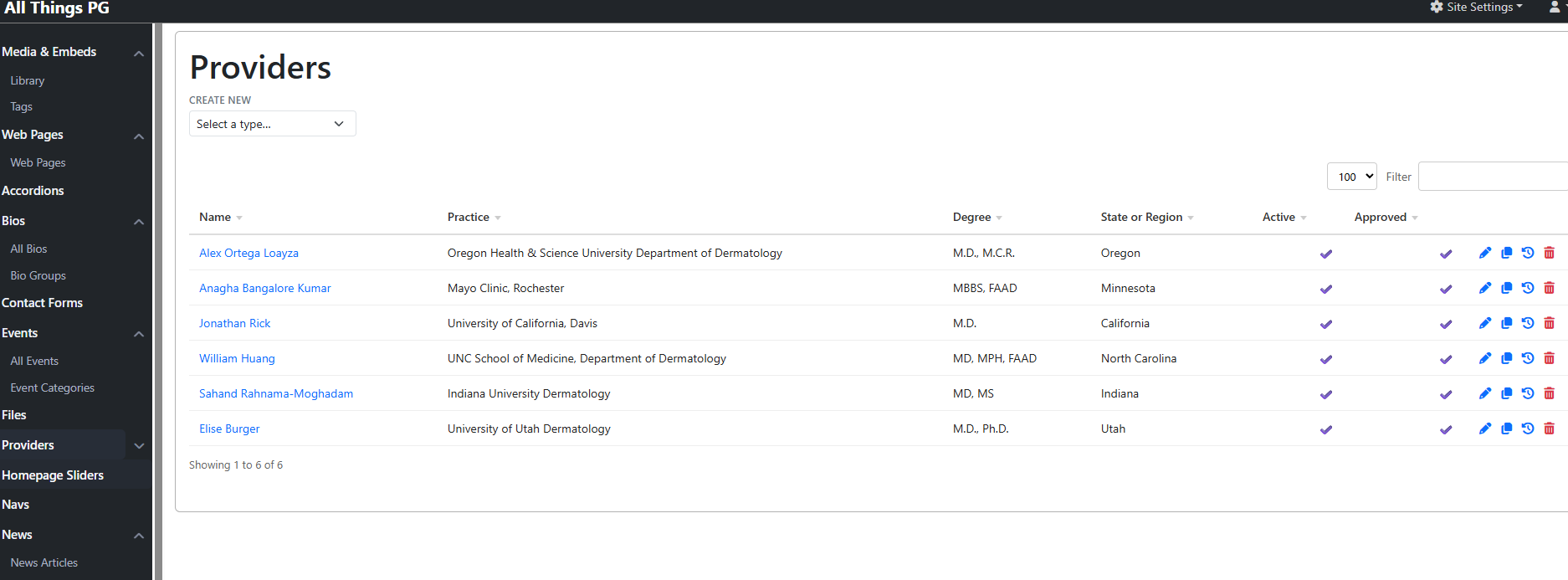
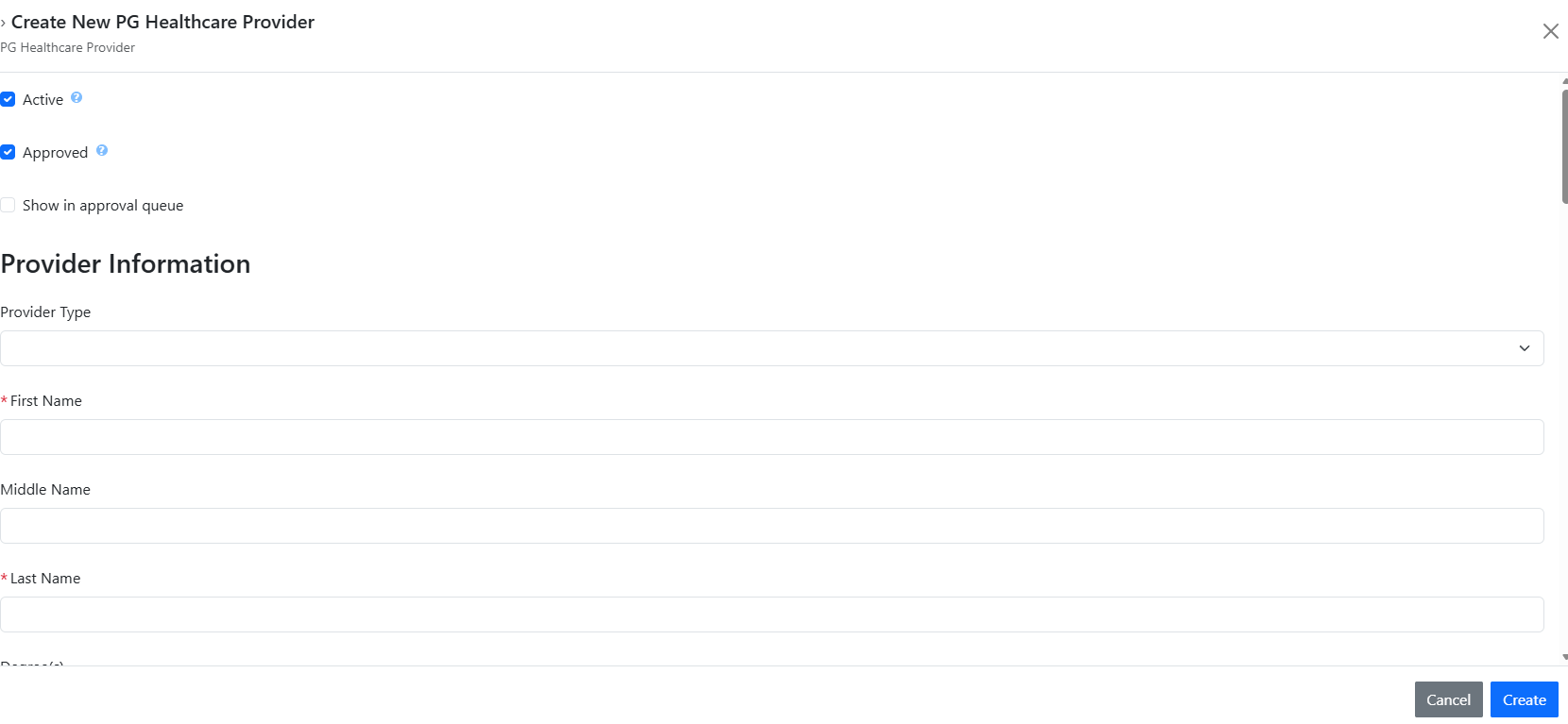
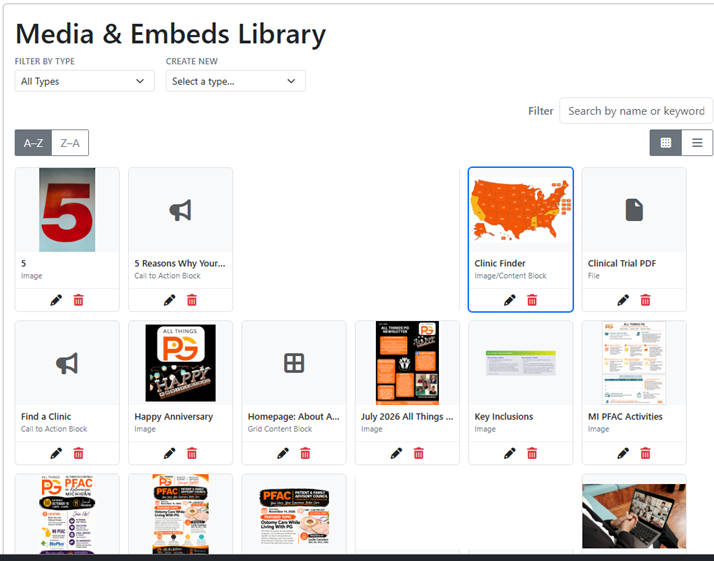
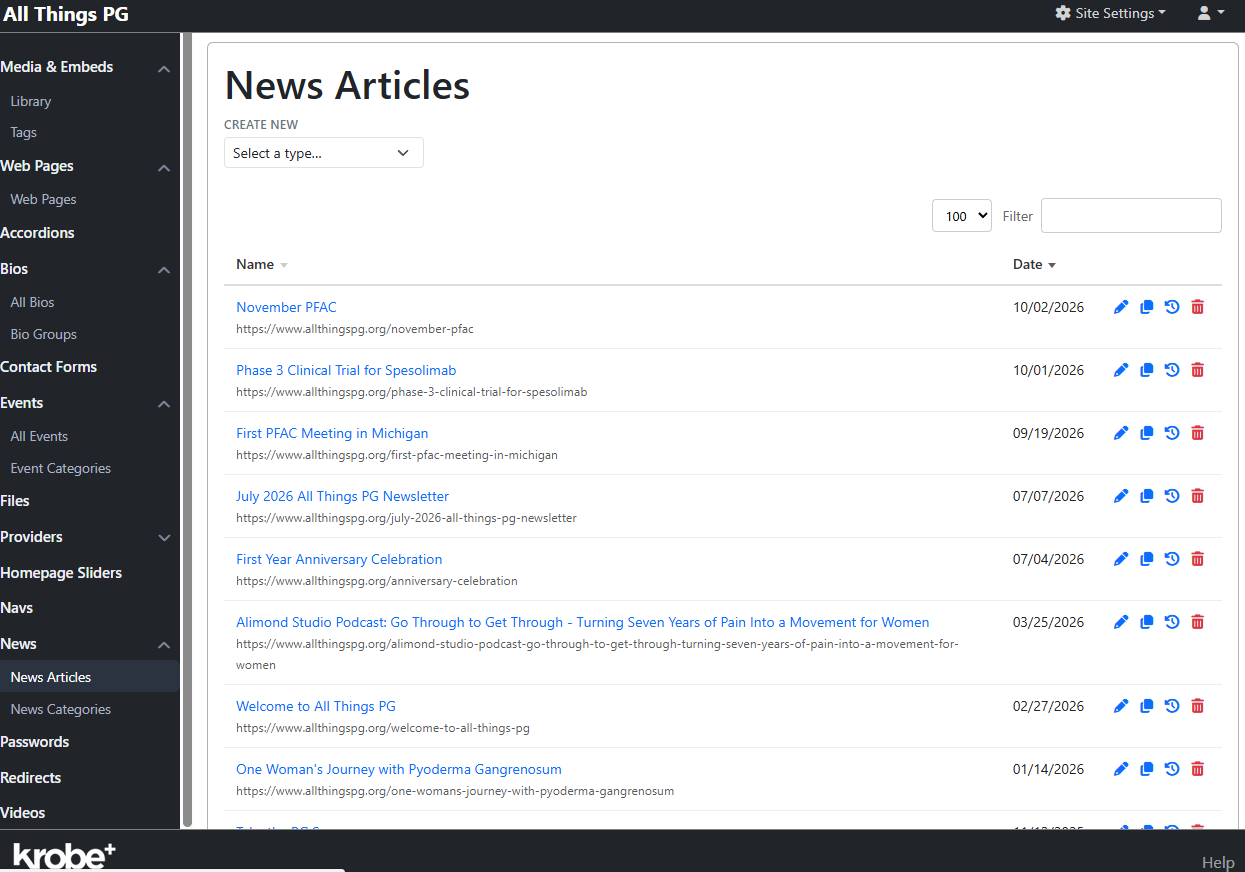
Phase 1 was built using a custom cms tool. There is an admin panel that allows for changes. Below are screenshots of some screens to demonstrate how it works and to provide a deeper understanding. These pics are from the cms editing tool to make changes to the webiste, such as web pages, news articles, list of providers for the clinic finder and the media library. For example, the provider list shows fields including practice, degree, state/region, active, and approved. You create a new provider one at a time by entering the fields. The Clinic Finder pulls that list of providers into the Clinic Finder.
Example: Adding a Provider
Right now we have 6 doctors for all the US. In otherwords, the Clinic Finder is a powerful tool, but isn’t very useful.
Providers are added by filling in the text boxes, one provider at a time. There’s no way to add additional types, like wound care centers, medical universities, mental health facilities etc. Its just for doctors and no way that I can see to add capability. The list is also not searchable, not that it matters with only 6 entries and no plans on adding more. Its a great feature that was never made usable.
Step One: Go to Providers and click Create (or edit)
Provider List
Step Two: Enter provider information into text fields and click Create
Add Provider
Example: Adding a News Articles
Adding a newsletter is a 4 step process. Fortunately we do not add newsletters often.
Step One: Add images to the media library
Add Media Library
Step Two: Go to News Articles and click Create
News Articles
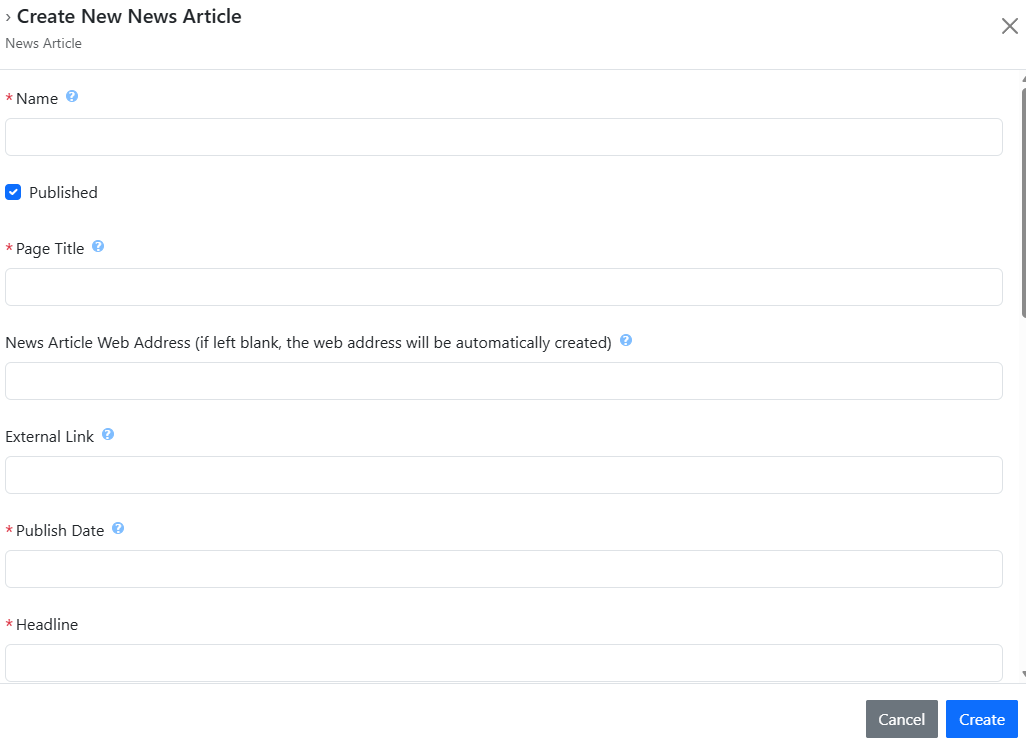
Step Three: Create a new newsletter and add its header information
Add News Article
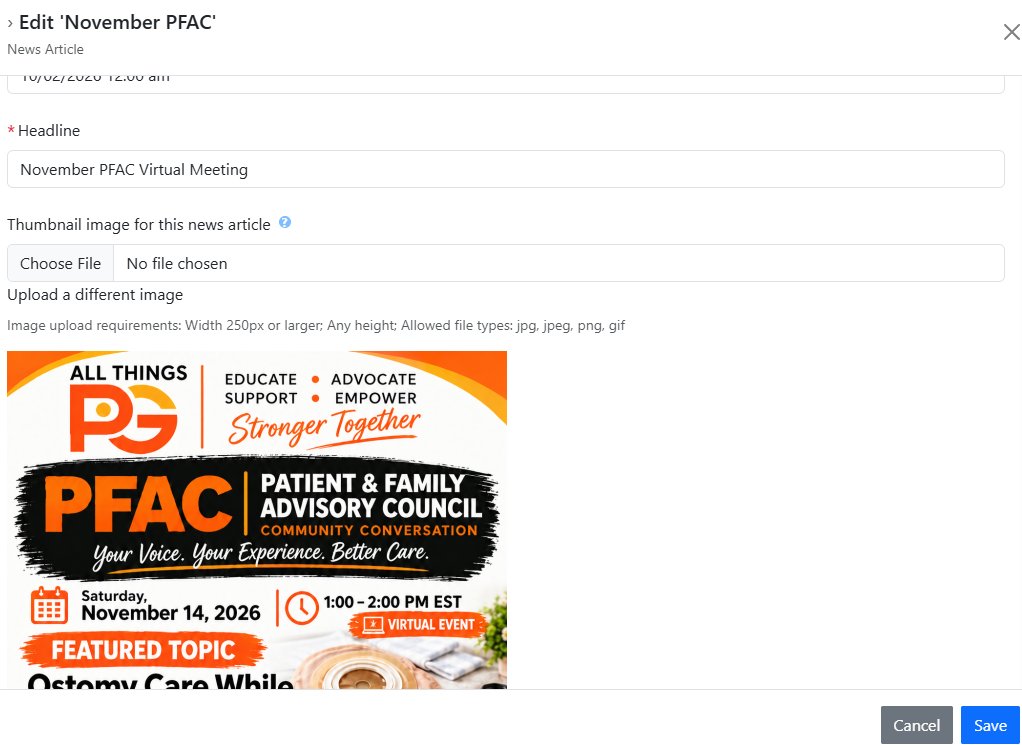
Step Four: Edit the newsletter page, add its image, title, and text, then save
Add Newsletter
The CMS tool works well for publishing within its existing model. However, it is not an extensible, meaning we live within the framework provided, unless the framework itself is enhanced. An editor can use the available content types and enter fields but cannot create new types of content or add new capabilities or functionality. All content is manual entry into flat files, typically one at a time. News and provider entry is manual editing per article or person. That cost and workflow affects how practical it is to maintain and grow features, even when the underlying idea is valuable. The cost is minimal when we do it ourselves. To hire Rusty is not free.
Comparison Methodology
This rest of this document compares the independent ChatGPT and Microsoft Copilot analyses of the Phase 1 All Things PG website. It focuses on substance rather than line-by-line differences. It reflects material from both AI independant, unbiased analysis in an attempt to be realistic and accurate on the reports, so they have value.
- What each model examined, including areas one model covered more fully than the other.
- Where both models agree on the site’s strengths and limitations, and where their conclusions differ.
- A consolidated set of recommendations for future development.
Areas Covered by Both Models
Both models examined:
- Mission and organizational clarity
- PG educational content
- Homepage focus and competing calls to action
- Navigation and information architecture
- The Clinic Finder
- News and events
- Search and content discovery
- Accessibility concerns
- Forms and third-party services
- Static-page scalability
- Structured content and database needs
- Editorial consistency and governance
- Audience-specific navigation
- Multilingual support
- Mobile and visual behavior, while acknowledging that these could not be fully verified through automated text retrieval
- Recommendations for future development
The broad overlap means the shared conclusions are based on examination of the same major dimensions of the website, not merely similar general impressions.
Areas ChatGPT Covered More Deeply
The ChatGPT report is broader and more prescriptive. It goes beyond assessment and develops elements of an implementation and product-design roadmap. Its additional depth includes:
- Patient journeys and task completion
- Detailed accessibility requirements based on WCAG 2.2
- Heading semantics, alternative text, keyboard access, visible focus, touch targets, zoom, and reflow
- Contact-form privacy risks involving sensitive health information
- Clinic Finder data normalization and maintenance
- Specific reusable content types and suggested fields
- Medical review metadata and source attribution
- Search analytics and zero-result searches
- SEO and structured data
- Core Web Vitals and performance risks
- Analytics tied to visitor tasks
- Publishing workflows and governance ownership
- Suggested homepage, educational-page, Clinic Finder, and search layouts
- Prioritized 30-day, 90-day, and longer-term plans
- Comparisons with other health and rare-disease websites
ChatGPT therefore provides the more complete future-state blueprint.
Areas Copilot Covered More Concisely
The Copilot report is shorter and stays closer to the immediate evidence found on the existing site. It emphasizes:
- What the site currently does
- The strengths and limitations of its static architecture
- Specific visible publishing defects
- Improvements that can be made without changing platforms
- Changes that require a longer-term content-platform solution
- The possibility of a hybrid transition rather than an immediate full replacement
Copilot is more restrained about technical details that could not be verified through automated retrieval. Its report is well suited to an executive audience because it presents the central findings without developing every finding into a detailed implementation specification.
What Copilot Did Not Cover to the Same Extent
Compared with ChatGPT, Copilot did not provide the same depth in:
- Formal accessibility analysis
- SEO and structured-data planning
- Performance planning
- Analytics and measurement
- Detailed privacy architecture
- Data-model design
- Content-governance ownership
- Wireframes or interface prototypes
- Comparisons with external nonprofit and health websites
- A phased implementation roadmap
Areas of Agreement
Agreed Strengths
Both models conclude that the Phase 1 website:
- Clearly communicates the All Things PG mission and identity.
- Provides understandable, patient-friendly information about PG.
- Contains a valuable foundation of medical education, organizational information, community activity, research participation, donation, and engagement tools.
- Includes a Clinic Finder with unusually high strategic value.
- Offers clear calls to action for finding care, participating in the survey, subscribing, and donating.
- Presents a transparent organization with visible leadership.
- Is readable, functional, uncluttered, and useful in its intended present role.
- Should be improved and expanded rather than described as a failure.
The analyses agree that Phase 1 has good raw material. Its main problem is not the absence of worthwhile content or programs. The problem is how those assets are structured, connected, prioritized, discovered, and maintained.
Agreed Limitations
Both models conclude that:
- The homepage presents too many competing messages without a clear starting path.
- Navigation reflects organizational categories more than visitor goals.
- Patients, caregivers, clinicians, researchers, industry representatives, and other audiences are not given sufficiently distinct entry paths.
- There is no adequate site-wide search or content-discovery system.
- News, events, research updates, and other recurring material are handled as flat or disconnected pages.
- The Clinic Finder should evolve beyond being treated as an isolated webpage.
- The static, page-by-page model will become increasingly difficult to maintain as content and programs grow.
- Recurring material needs structured content types, templates, metadata, categorization, filtering, and reusable presentation.
- Editorial inconsistencies indicate a need for publishing standards and quality control.
- Accessibility requires dedicated testing rather than assumptions.
- Language choices should not imply that translated content is available unless the translations are genuinely implemented.
- Mobile, interactive, and visual behavior require direct browser and device testing.
- Phase 2 should address architecture and visitor journeys, not merely change colors, fonts, or visual styling.
The strongest shared architectural finding is that the current site behaves as a collection of individual pages rather than as an integrated information and service platform.
Shared Findings
Strengths
- The site communicates its mission and intended community clearly.
- The core educational material provides a useful foundation for patients and caregivers.
- The organization has meaningful community and research activity, leadership information, and engagement paths.
- The Clinic Finder represents a valuable service concept and gives the site a practical purpose beyond publishing articles.
- The site is functional for visitors who already know which page or action they need.
Usability and Growth Limits
- The homepage presents many competing messages and does not make the best starting path clear for every visitor.
- Navigation reflects organizational groupings more than the questions and tasks visitors arrive with.
- The site has no adequate site-wide search or content-discovery system.
- News and events are laborious to add, and the CMS dictates a fixed presentation with little editorial control.
- The content model is fixed. When a need does not fit existing Krobe options, editors cannot address it by adding fields or a new content type.
- As the volume and variety of content grow, manual entry and disconnected pages make information harder to maintain, relate, and find.
- Medical review and ownership signals, publishing quality controls, privacy explanations, and language support need attention.
- Accessibility, mobile usability, and performance require direct testing; the analyses did not measure them.
Clinic Finder: Valuable Idea, Unproven Operational Value
The Clinic Finder is a well-liked and promising feature, but its existence alone does not mean it is ready to serve as a useful directory. It launched without many doctor listings(current 6). Providers are the only types permitted. There’s no ability to add other types like clinics, wound care centers etc.
The provider-list screenshot establishes the administrative fields and shows six records; it does not show the public map’s behavior. It is to recognize the idea’s value, document the current maintenance burden and limits, and avoid assuming that a visual map is equivalent to a searchable directory. The concept and implementation of the Clinic Finder is valuable, but the underlying data is insufficent and not extensible.
The Core Architectural Constraint: No Database
Phase 1 is permanently static and has no database. Its fixed options cannot be expanded to add database-backed capabilities. This is not a missing CMS setting or an editor-training issue; it is a boundary of the architecture.
A database is a persistent data store that software can query and update. It can support flexible relationships and search across records. Labeled fields, metadata, or separate CMS record lists may be useful structure, but they are not a database-backed application. The distinction matters because without a database, the current site cannot evolve into the kind of flexible, searchable information resource that the PG community may need. Growth is constrained to adding more of the existing kinds of pages and records through the existing manual workflows.
This is the most consequential shared implication of the analyses: the site’s constraints are not limited to how a page looks or how its navigation is labeled. The fixed static architecture limits the ability to organize information around varied user needs, connect related material, and make a growing collection genuinely searchable. Those limits become more significant as All Things PG’s information and service responsibilities expand.
Recommendations for Assessing Phase 1
- Preserve the accomplishment. Phase 1 delivered a polished and useful foundation quickly, meeting the original goal of establishing an online presence.
- Describe the CMS accurately. It works within a small fixed model, but it is cumbersome, rigid in presentation, and not extensible by editors.
- Treat “structured data” carefully. Do not equate CMS fields or metadata with a database or imply they enable database-backed search.
- Recognize the maintenance cost. The multi-step provider and news workflows, limited control, and there is maintenance cost to perform ongoing updates (which is normal).
- Keep Clinic Finder conclusions proportionate. The feature is promising and well-liked, but currently has six records, a manual entry workflow, and—per the owner’s assessment—no useful search/filter experience. The evidence does not support recommending expansion now.
- Separate verified defects from items requiring tests. Confirm source-dependent, visual, accessibility, mobile, and performance concerns directly before presenting them as established faults.
Overall Conclusion
Phase 1 was an excellent first start. It accomplished its goal to get something out there quickly, and cheaply. We created something valuable, as it established All Things PG’s foundational presence by Septemer 2025, and that accomplishment deserves recognition. At the same time, the architecture is fixed and static without a database and we will ALWAYS be limited by the cms framework. This custom CMS works well, but it is limits the ability to add new features. You can add new pages, but not new features. There is no functionality with a static website. The one exception is the Clinic Finder. I suspect that’s a static page that just refreshes based on the state selection. There may be some JScript code at play, its hard to tell. But that is the exception.
If we do Phase 2 and add a database, that create the ability to add unlimited features. One important item stands out - data migration. Once we have a working database, all content in Phase 1 will be loaded into Phase 2, and the website itself will look very similar (not 100% exact).
To wrap things up:
Phase 1 succeeded as a first-generation website, while its architecture limits how far that website can grow into the resource the community may need. Future enhancements require growing the site to use structured data instead of manual entry and flat-files. This will be essense of Phase 2 Framework and then we can build new features on any scale for years to come.