
What is DCMS?
DCMS stands for Dynamic Content and Menuing System. It is a design that I have been working on for more than a year, and based on many years of database experience. It is the main database design that supports the Phase 2 website as a a data-driven content creation and menu item navigation system. We can add any new content, linked to any new menu item, and it will show up on the website without any additional programming changes. This allows for unlimited growth, and all the work is done in the database, not in HTML pages.
Below you will find conceptual diagrams to describe DCMS. For more detailed diagrams of the database itself refer to Database Diagrams to show the underlying table relationships.
DCMS at a glance
The following diagram illustrates the general flow of data through DCMS.
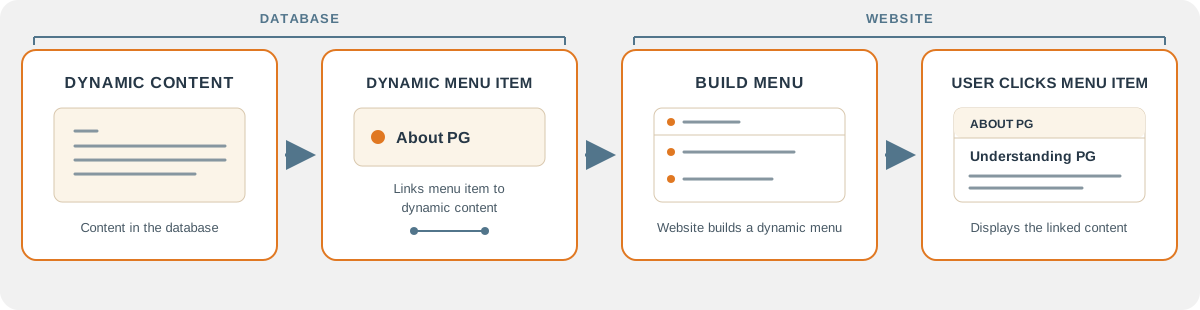
Dynamic Content is curated by anyone able to do so, even AI and other tools. It is first stored in a staging environment so that it can be vetted and published, and moved to production. The Dynamic Content is then linked to a Dynamic Menu item so that it can get displayed on the website. This is a powerful natural flow that allows the ATPG website to change as the world of PG change.
Content is not just articles about PG. It could be patient stories, pictures, or a list of wound care center. It doesn’t matter. The amount and types of content are endless, an DCMS can handle it.
Refer to additional discussions on Dynamic Content and Dynamic Menus.
It is called Dynamic Content because we can change what the content is based on the type of visitor using the system. For example, a Doctor may want to see content differently that a Patient. That makes it dynamic.
A visitor’s path through DCMS
The visitor type shapes the menu and thus the content that is displayed, once we know who the visitor is, and by default the visitor is a Guest. Other visitor types include Patient, Caregiver, Provider and Pharmaceutical.
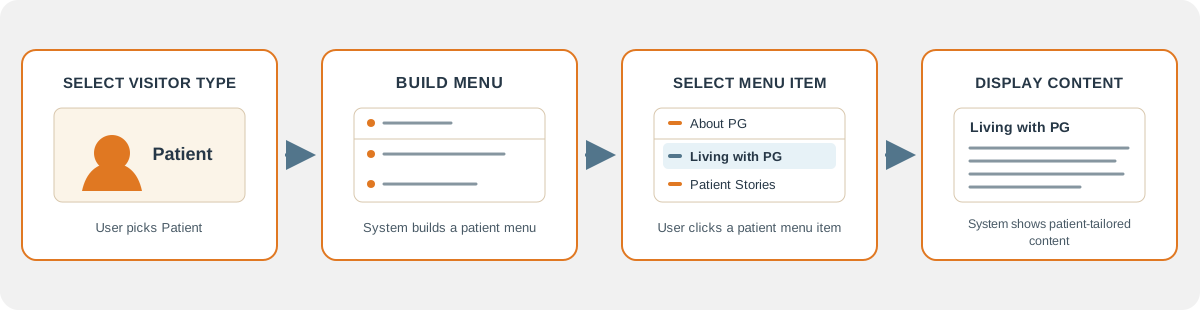
This design connects several different pieces of DCMS and the website to achieve an overal Enhanced User Experience.
Visitor Type The user chooses a visitor type: patient, caregiver, provider, pharmaceutical, or guest. Dynamic Menu Visitor masks determine which menu items appear for each visitor type. Dynamic Content Content is curated in staging and published. Menu items can link to different content for different visitor types. User Portal Content is displayed through a customized portal for that visitor type.
For example, a patient and a provider may both see a menu item called “Diagnosis.” Each menu item has a different identity and can link to a different document, allowing the provider version to include more technical detail.
What is implemented now
The SQL Server project defines the DCMS tables, constraints, lookup data, views, and stored procedures. The Razor proof of concept demonstrates database-driven menus, visitor filtering, route handling, and content retrieval. A menu import process loads Master_Menu.csv, creates staged menu records, validates them, and publishes the menu structure. Content-route items receive placeholder documents so each has a ContentDocumentID before an article is written.
The current database contains a menu structure and unpublished placeholder documents, but no authored or published PG articles. The import and migration publication routines also rebuild content, so they need preservation behavior before routine updates are made against an authored library.
Basically, the structure of the menus and content is there, but no content other than some small test records.
Summary
DCMS is the content and navigation foundation to build a searchable PKnowledge Base for Pyoderm Gangrenosum. Once content is populated, the KB will also be populated. The moving parts are that content is linked to menu items, and menu items are dynamically created in the website based on the user type. When a user clicks on a menu item, they are seeing content that is specifically created for them, and from within a customized user portal that makes the entire website a Patient Portal, or a Doctor Portal.
This all comes from the vision that DCMS offers to Phase 2.
- Curated Content
- Dynamic Content
- Dynamic Menu Items
- Knowledge Base
- Enhanced User Experience
Continue with Dynamic Content to see how documents and blocks are represented, or Dynamic Menus to see how menu data selects navigation and destinations. The database section documents the implemented relational model.
For the implementation-level references, see content structure, menu behavior, and the menu publication workflow.